
‹ Swipe for tutorials ›
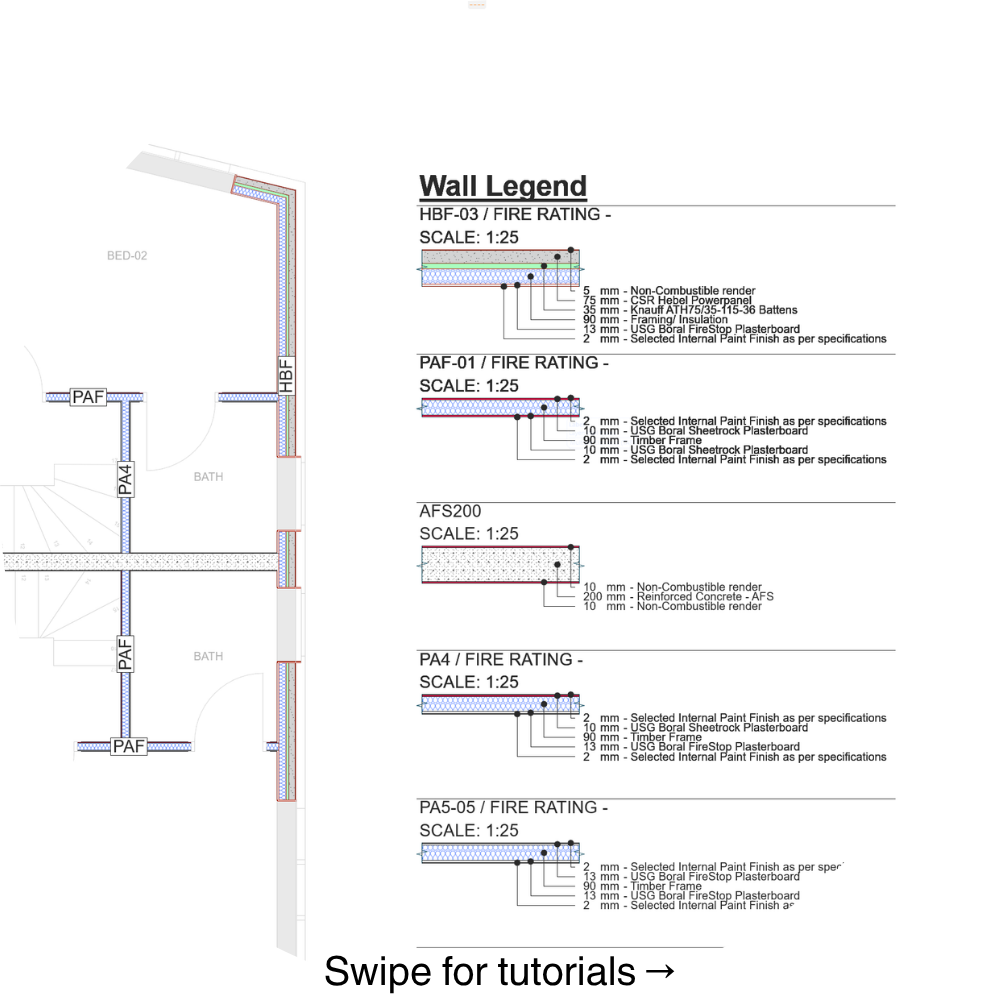
Wall Legend is an associative Archicad label designed to simplify wall build-up documentation.
Attach the label to a composite wall to display a short Composite Code directly on the element, together with a detailed legend showing the full wall build-up.
The label reads the wall composite structure and identifies each skin individually through its own leader line, including its thickness and Building Material.Its key feature is the use of dedicated leader lines for every skin, making the legend much clearer and easier to read in both plans and sections.
For multiple walls, Wall Legend can be used together with Archicad’s Element ID Manager to automatically organize and position labels in sequence, reducing the need to manually arrange each legend entry.
Key features
Associative Archicad label
Reads composite wall structure automatically
Displays a short Composite Code directly on the wall
Shows the full wall build-up
Dedicated leader lines for every composite skin
Displays skin thicknesses and Building Material names
Automatic layout for multiple walls
Row or column arrangement
Can be used in floor plans and sections
No additional add-on required
Workflow
Select the walls you want to include, assign temporary IDs using Element ID Manager, then apply Wall Legend using Label Selected Elements.The labels are automatically positioned in sequence based on the temporary IDs.For individual elements, Wall Legend can also be attached directly using the Label Tool or Label Selected Elements.
Compatibility
Compatible with Archicad 25 and newer versions.Wall Legend works as a standard associative Archicad label. No additional add-on is required.